🚀 Auto Publishing
Automatic Publishing to YouTube Shorts and TikTok
The final step in the EzClap workflow is getting your clips published.
EzClap is built to handle that part for you, so you do not have to manually move video files to your phone, upload them in a browser, or repeat the same posting steps every day.
Connect Your Publishing Accounts
Before EzClap can publish anything, you need to connect the platforms where your clips will go.
Right now, EzClap supports direct publishing to:
- YouTube
- TikTok
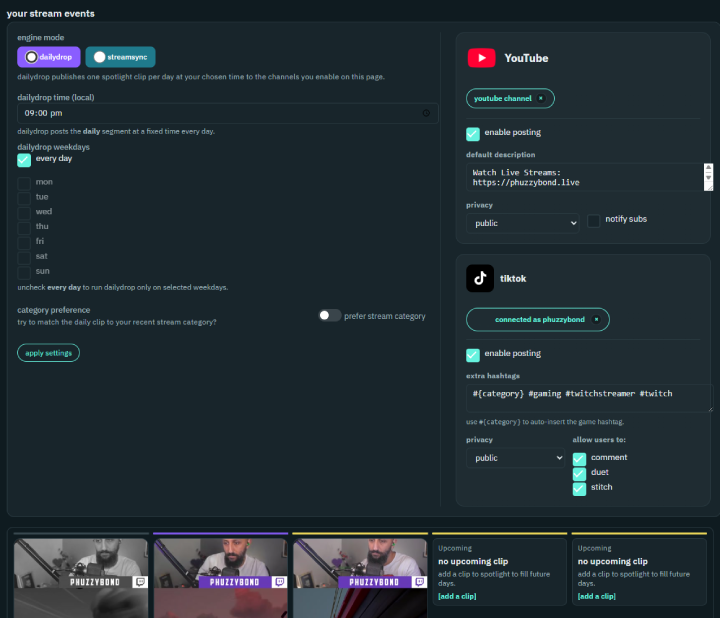
To connect them, just use the account connection buttons, authorize EzClap, and your publishing destinations will be ready.
Once connected, EzClap can send approved clips from your Spotlight queue straight to your selected social platforms.
Set Default Descriptions and Hashtags
Because EzClap is built as a set-and-forget system, you can prepare your default publishing text in advance.
This includes things like:
- YouTube description text
- TikTok hashtags
- reusable publishing text that gets added automatically
The title you set in the Clip Editor becomes the main title of the Short or TikTok. After that, EzClap can append your saved default text so you do not need to write the same descriptions and hashtags over and over again.
Dynamic Hashtags with #{category}
One of the most useful automation features in EzClap is the dynamic category tag.
If you add:
#{category}
to your YouTube description template or TikTok hashtag settings, EzClap will automatically replace it with the game category from the stream where the clip was created.
For example:
- if the clip was made while you were playing Valorant, EzClap can insert
#Valorant - if the clip was made while you were playing Minecraft, EzClap can insert
#Minecraft
That means you do not need to keep updating your publishing settings every time you switch games or categories. EzClap handles it for you automatically.
Publishing Modes
EzClap includes two different automated publishing modes, depending on how you want your content to go out.
1. DailyDrop
DailyDrop is the steady content schedule option.
In this mode, EzClap takes clips from your Spotlight queue and publishes them automatically based on the schedule you choose.
You can control:
- which days clips should go out
- what time they should publish
- the ongoing rhythm of your content output
This is useful if you want a consistent stream of daily or scheduled content, even on days when you are not live.
For many streamers, DailyDrop is the easiest way to stay active on short-form platforms without thinking about uploads every day.
2. StreamSync Mode
StreamSync is built around your actual Twitch streaming schedule.
Instead of publishing on a simple daily timer, StreamSync lets EzClap align clip publishing with your live stream timing.
For example, some streamers want clips to go live:
- shortly before a stream starts
- shortly after going live
- at specific timing windows connected to stream activity
EzClap supports this through preset publishing segments.
Because this mode depends on your real stream schedule, your Twitch schedule events need to be populated correctly for StreamSync to work as intended.
Which Publishing Mode Should You Use?
Both modes are fully automated, but they solve different problems.
Use DailyDrop if you want:
- a simple daily or weekly posting schedule
- steady output across YouTube Shorts and TikTok
- content going out even on off days
Use StreamSync if you want:
- clip publishing tied to your live stream schedule
- posts timed around when you go live
- a workflow that follows your streaming rhythm more closely
Why Automatic Publishing Matters
For Twitch streamers, the hardest part is usually not making content.
It is staying consistent with posting.
Automatic publishing removes one of the biggest friction points in short-form content workflows. Instead of downloading clips, renaming files, uploading manually, copying hashtags, and repeating that process every day, EzClap handles the publishing side once your workflow is set up.
That means you can focus more on streaming while still keeping your short-form content active.
A Set-and-Forget Workflow
Once your accounts are connected, your default text is set, and your publishing mode is chosen, EzClap can keep your content moving automatically.
The workflow becomes simple:
- clips get processed
- you review and approve them
- you add them to Spotlight
- EzClap publishes them for you
That is the whole point of the conveyor belt.
Next Step
Once automatic publishing is configured, the next step is learning how Spotlight, released clips, and scheduling work together across the full EzClap Workflow.