Settings and Auto-Sweeper
EzClap Settings and the Auto-Sweeper
The Settings page is where you handle the less exciting administrative parts of EzClap — but a few things here matter a lot for keeping your workflow clean, and one of them is the star of this page:
the Auto-Sweeper
What's on the Settings page
- Subscription & Billing — your plan, trial, and the billing portal. Covered in plans and billing.
- Watcher Configuration — the filtering mode that controls whose clips get processed automatically: Disabled (Process Everyone), Whitelist, or Blacklist, plus the clipper access list. Covered in fetching clips.
- Captions — the transcription language (auto-detect by default, or force English, French, German, Spanish, Italian, Portuguese, or Dutch), a censored words list that automatically replaces listed words with *** during caption generation (the audio is silenced too), and an optional censorship bleep sound with its own volume control.
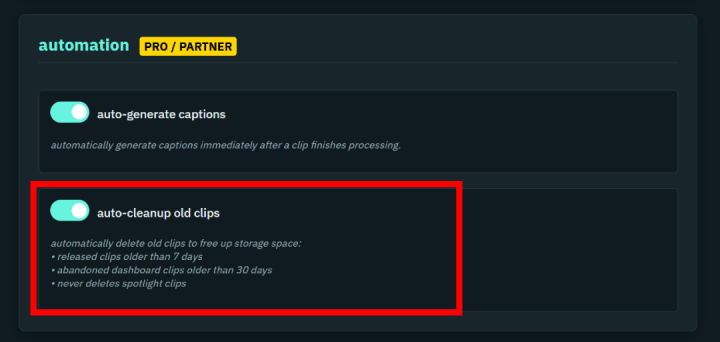
- Automation (Pro / Partner) — the Auto-Generate Captions toggle, so every clip is captioned immediately after processing, and the Auto-Cleanup Old Clips sweeper below.
- Discord notifications — paste a webhook URL and EzClap pings your Discord channel when a clip is created.
What is the Auto-Sweeper?
Every content creator has that one folder full of random clips they swear they will edit later. Most of the time, they never do.
When EzClap is constantly pulling in clips from your Twitch streams, your dashboard can fill up fast if nothing is cleaning up the leftovers. That is exactly what the Auto-Sweeper is for.
The Auto-Sweeper acts like the cleanup system for your EzClap dashboard and storage. Once enabled (it's part of the Pro / Partner automation set), it automatically removes clips that have been sitting around too long without being used.
How the Auto-Sweeper works
The sweeper handles two cleanup jobs automatically:
1. Abandoned dashboard clips are deleted after 30 days
If a clip sits on your dashboard and you never add it to Spotlight, EzClap deletes it after 30 days. Your dashboard stays focused on fresh clips instead of slowly turning into a graveyard of old "maybe later" content.
2. Released clips are cleaned up after publishing
When a clip is published, EzClap marks it as released and removes it from Spotlight. After that, the sweeper keeps it around for 7 more days, then deletes it automatically. This gives you a short buffer after publishing without forcing you to manually clean up every finished clip.
The sweeper never deletes clips that are in Spotlight. Anything you have queued for publishing is safe.
Why the Auto-Sweeper matters
The Auto-Sweeper is not just about being tidy — it protects your workflow.
If your storage fills up, EzClap cannot keep creating and processing new clips properly. So automatic cleanup is important if you want the system to keep running smoothly in the background — especially if you batch process with the Super Editor.
With the sweeper enabled:
- old unused clips do not pile up forever
- published clips do not stay around longer than needed
- your dashboard stays focused on current content
- your storage stays under control
- you do not have to manually delete clips all the time
Why most streamers should use it
If a clip was not good enough to move into Spotlight within 30 days, chances are it was never going to be part of your real content plan.
The Auto-Sweeper helps you stop hoarding clips "just in case" and keeps your system focused on content that actually matters. When you log in, you are looking at fresh opportunities instead of hundreds of stale clips you already ignored weeks ago.
A cleaner dashboard, without manual work
The whole point of EzClap is to remove repetitive work from your content pipeline, and the sweeper fits that idea perfectly. Instead of babysitting storage, organizing old clips, and manually deleting finished content, EzClap handles the cleanup automatically in the background.
Next step
Creating content is not only about publishing clips — it is also about bringing the people who watch your clips into your streams. That is where the stream schedule and calendar sync comes in.